
Boot Modes
Garden Linux supports two primary boot modes: Legacy and Unified System Image (USI). Legacy is the traditional approach used by most Linux distributions. USI is a modern, security-oriented mode that embeds the entire root filesystem into a single signed Unified Kernel Image (UKI).
TIP
If you are unsure which mode to pick, use the _trustedboot images. These are USI images with all optional security features enabled. See Secure Boot and Trusted Boot for details.
Comparison
| Feature | USI | Legacy |
|---|---|---|
| UEFI boot | Yes | Yes |
| BIOS boot | No | Yes |
| Secure Boot / Trusted Boot | Optional | No |
| In-place updates | Yes | No |
| TPM 2.0 disk encryption | Optional | No |
Legacy Boot Mode
Legacy boot mode uses a standard partition layout with a boot partition (used by both syslinux for BIOS boot and systemd-boot for UEFI boot) and an ext4 root partition.
vda
├─vda1   vfat  FAT32  EFI    28M    /efi
└─vda2   ext4  1.0    ROOT   ~30G   /
The rootfs is fully mutable. Legacy mode does not attempt to provide any protection against offline attacks and does not support Secure Boot or TPM 2.0 disk encryption.
The _legacy feature selects this boot mode.
Unified System Image (USI)
The USI design is loosely inspired by Lennart Poettering's ideas on how modern operating systems should boot. It fully embraces Unified Kernel Images (UKIs) and an immutable root filesystem. However, the design differs in how the root filesystem is verified.
In Lennart Poettering's design, the root (or just the /usr partition) is stored on a dm-verity disk; the root hash of the dm-verity Merkle tree is then embedded into the UKI. While this design works well, it does add quite a bit of complexity. It requires at least three partitions (more if you want in-place updates with A/B partitions): EFI system partition, root dm-verity data partition, and root dm-verity hash tree partition.
Due to the incredibly small footprint of our root partition, we can afford to go a different route: we can embed the entire root filesystem into the UKI. This is done by packing the root filesystem into an EROFS image, which gets embedded into the initrd.
This UKI with an embedded rootfs is what we call a USI.
Loop mounting an EROFS in this way implies we have a fully immutable rootfs by default. This has the added benefit of significantly simplifying the operation of the initrd. It no longer needs to detect devices or disks; instead, the job of the initrd is now only to loop mount the embedded EROFS and pass control to it.
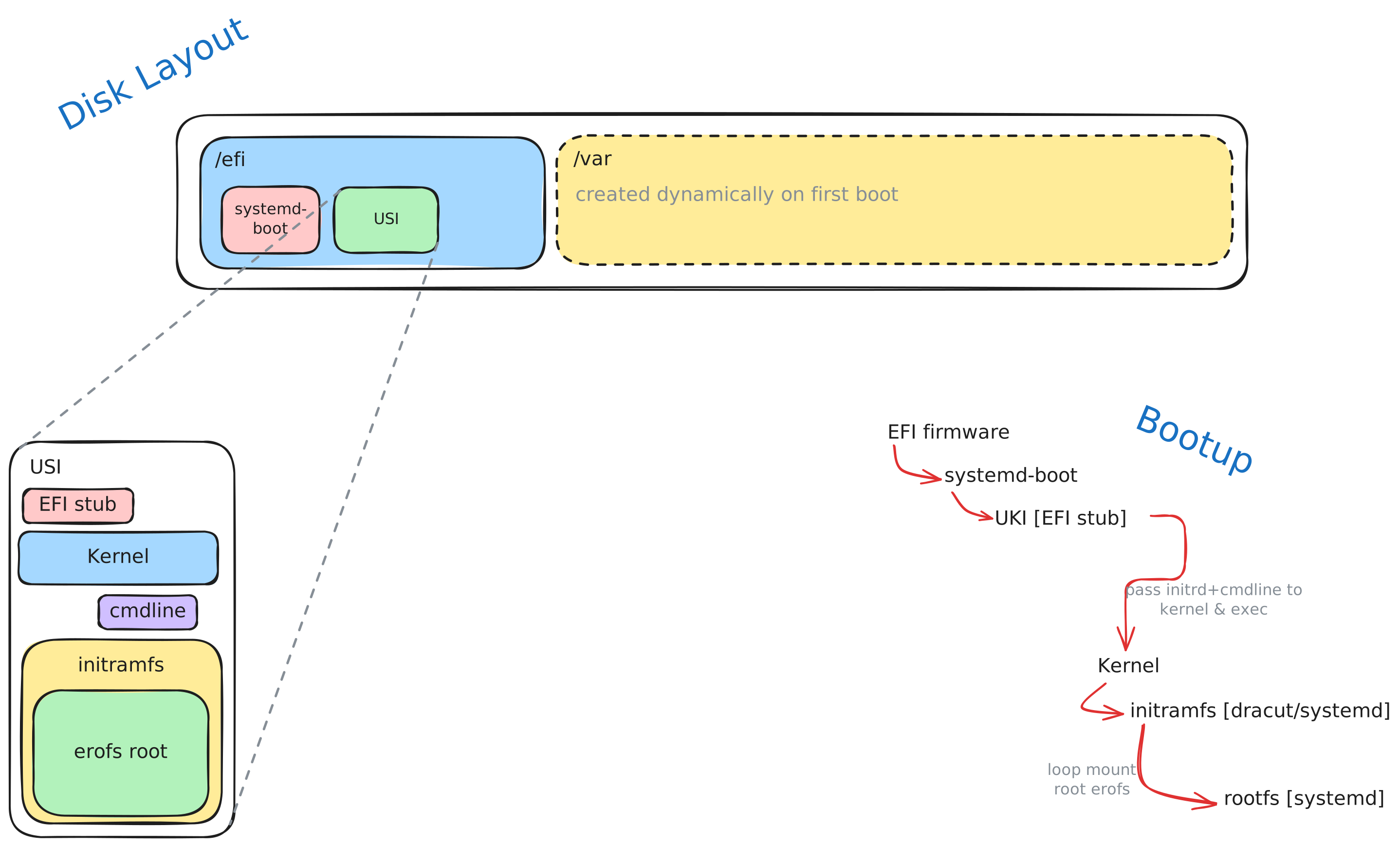
USI is UEFI-only and is a prerequisite for Secure Boot and Trusted Boot.
The _usi feature selects this boot mode.
Mutable Data Modes
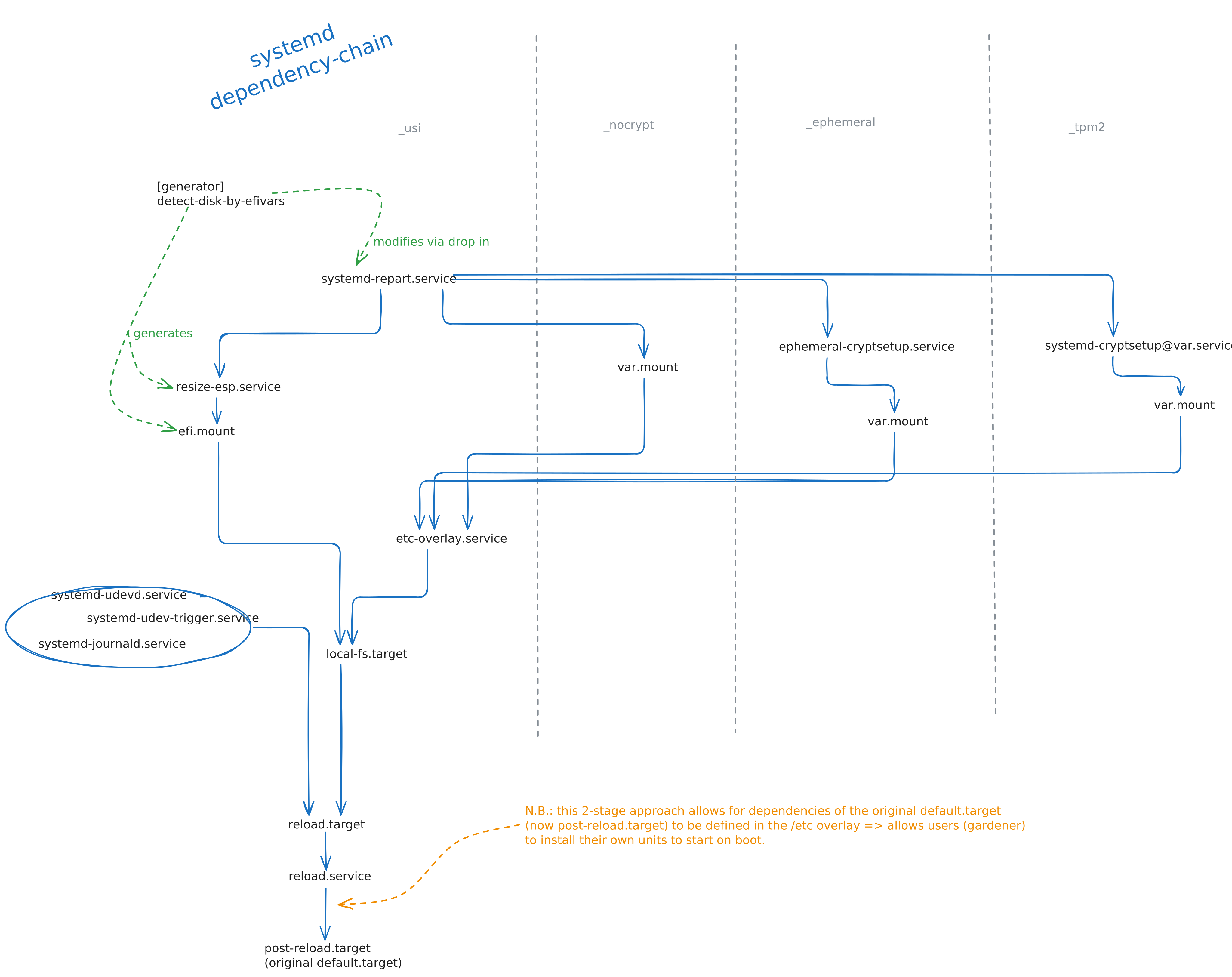
While an immutable root filesystem provides strong security guarantees, most systems require writable state. Garden Linux mounts /var as writable, and provides an overlay on /etc backed by /var/etc.overlay. The /var partition is created and managed by systemd-repart, which automatically uses the available space on whichever disk the ESP is on.
Three modes of operation are available for the /var partition:
| Mode | Persistent data | Offline attack protection | Requires TPM 2.0 |
|---|---|---|---|
_nocrypt | Yes | No | No |
_ephemeral | No | Yes | No |
_tpm2 | Yes | Yes | Yes |
_nocrypt:/varis backed by a plain ext4 partition. This is the default USI storage mode._ephemeral: A clean partition is created on each boot and encrypted with a per-boot random key. Data does not survive reboots._tpm2: The partition is created on first boot and encrypted with a key sealed to the machine's TPM 2.0 device. The TPM secret is bound to PCR 7 (the Secure Boot certificate chain), so decryption is only possible if the Secure Boot state is unchanged on subsequent boots. This mode should be combined with_trustedboot.
Under the Hood
The following diagram shows the systemd unit dependency chain during a USI boot:
Secure Boot and Trusted Boot
Garden Linux supports UEFI Secure Boot and Trusted Boot, which extends Secure Boot to validate the entire boot chain including the rootfs.
For a full explanation of Secure Boot, Trusted Boot, and their feature dependencies, see Secure Boot and Trusted Boot. For cloud-provider deployment steps, see Deploying Secure Boot Images.